Glucose Buddy Diabetes Tracker
- 2.0
- Rating
- 500.00K
- Installs
- Free
- Price
 Analysis by App-foxy
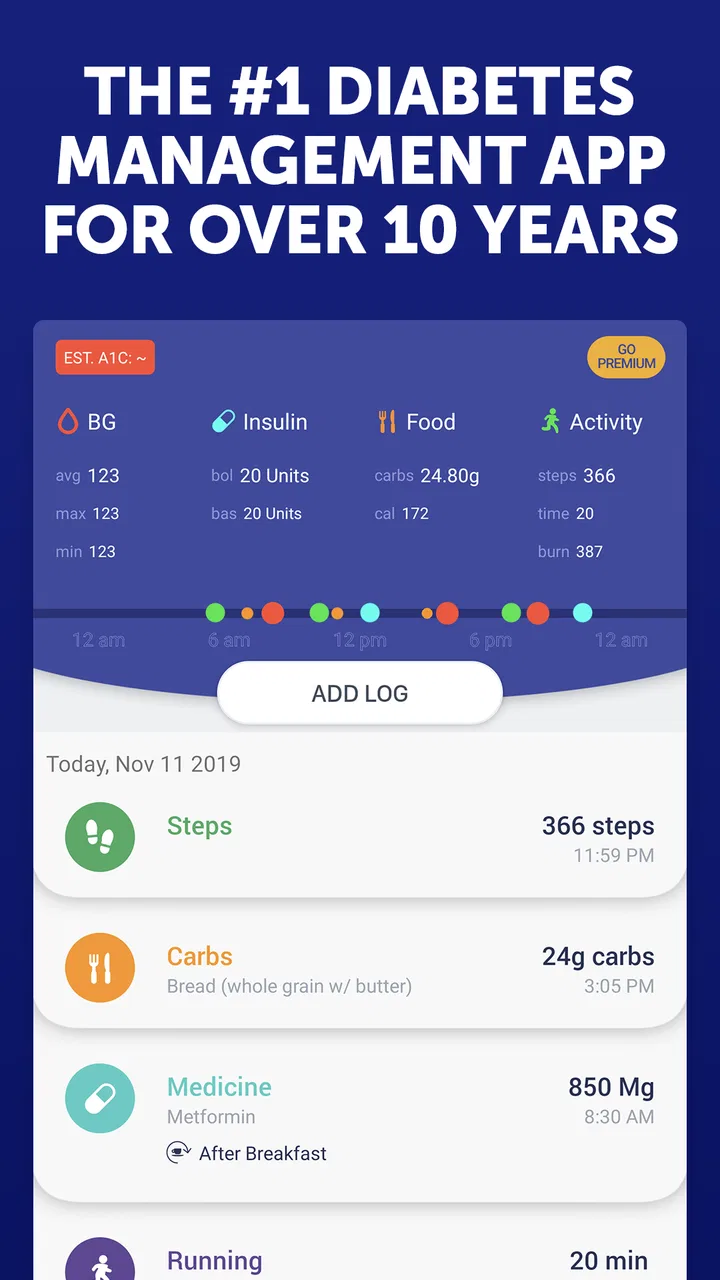
I approached Glucose Buddy Diabetes Tracker as a practical health log rather than a replacement for medical care, and that distinction matters. Its main appeal is bringing blood glucose, A1C, carbohydrates, medication, exercise, and related notes into one place instead of scattering them across paper notebooks, phone reminders, and separate food or activity apps. In everyday use, that can make patterns easier to discuss with a clinician and easier to remember yourself.
My overall view is mixed but clear: this is a useful idea for people who want a dedicated diabetes journal, yet the experience is not polished enough to suit everyone. The app is free to start, made by Azumio Inc., and available to an Everyone audience. It has been around since June 11, 2012, so it is a familiar name in the medical tracking space, but its current average rating of 2.0 from roughly 15 thousand ratings suggests that many users have encountered friction. I would recommend trying it cautiously, especially before relying on it as the only place for important health records.
What the tracker does well in daily diabetes management
The strongest part of the concept is its single-record approach. Diabetes management is rarely just a glucose number. A reading makes more sense beside the meal that came before it, the medication taken, the amount of movement that day, and any unusual circumstances such as illness, stress, or a missed routine. A focused tracker encourages that context instead of reducing the day to isolated measurements.
You May Also Like

 Google Keep - Notes and lists
Google Keep’s Quiet Growth Shows the Appeal of Simpler Notes
As mobile work gets busier, Google Keep keeps winning a simple contest: capture a thought quickly, find it later, and get on with the day.

 Blood Strike: 2.5 Anniversary
Blood Strike’s Loadouts Turn Every Drop Into a Tactical Gamble
A close look at Blood Strike’s custom loadouts: how fast access to signature weapons reshapes its battle royale rhythm, rewards preparation, and narrows the gap between fights.

 Pandora - Music & Podcasts
Pandora’s Music Is Easy to Start, but Harder to Recover
Pandora’s strength is its low-effort path from a seed to a station. Its weak spot is how much confidence it asks you to place in connection, setup, and quiet recovery.

 8 Ball Pool
 Is Built on Rivalries, Rematches, and Routine
A close look at the rivalries, rematches, shared routines, and unanswered safety questions that turn a quick pool match into a persistent mobile community.

 Samsung Music
’s Quiet Strength Is Playing What You Already Own
Its reach comes less from spectacle than from dependable access to a personal library. That simplicity is both the app’s strongest retention engine and its ceiling.

 AccuWeather: Weather Radar
AccuWeather Review: A Quick, Clear Forecast for Everyday Decisions
For everyday plans, the best forecast is the one you can understand quickly. AccuWeather makes rain timing, radar, and local conditions easy to act on, with a few trade-offs.
More From Our News Desk



I find this especially useful when preparing for an appointment. Rather than trying to reconstruct several weeks from memory, I can review entries and look for recurring situations: higher readings after a certain type of meal, changes after exercise, or gaps in medication notes. The value is not that the app diagnoses the reason for a pattern. The value is that it helps turn vague recollection into a more organized conversation with a healthcare professional.
The store summary specifically centers on glucose, A1C, carbohydrates, medication, and exercise, which gives the app a broader role than a simple blood sugar notepad. That breadth is important for users who want one diabetes-focused workspace. Someone who already records readings in a notebook may appreciate being able to add the surrounding details without carrying another paper log.
There is also a practical advantage to using a purpose-built medical app instead of a general notes application. A blank notes page gives you freedom, but it also leaves you responsible for inventing a consistent format. A diabetes tracker starts from the assumption that these categories deserve regular attention. That structure can reduce the small decisions that often cause logging habits to fade.
A realistic routine where it earns its place
Imagine a weekday when breakfast is rushed, lunch happens away from home, and an evening walk changes the usual schedule. With a general notes app, I might write “morning reading okay, lunch was late, walked after dinner,” then struggle to interpret the entry later. A dedicated tracker makes it more natural to record the reading, meal-related carbohydrate information, medication, and activity as separate pieces of the same day.
The useful habit is not entering every detail perfectly. It is recording enough context to make the record meaningful. If I notice that a particular pattern repeats, I can bring that observation to my clinician rather than making a treatment decision alone. This is one of the app’s most responsible use cases: supporting better questions, not pretending to answer medical ones.
A less obvious benefit is that the log can expose missing information. If glucose readings are present but medication notes are regularly absent, the record shows that the picture is incomplete. That can encourage a more consistent routine. The same applies to exercise or carbohydrate entries. The app’s value grows when the user treats it as a timeline of decisions and circumstances, not merely a collection of numbers.
Why a dedicated log can beat familiar alternatives
Paper remains a perfectly reasonable alternative for people who dislike screens or want a record they can annotate freely. It also avoids account and device frustrations. However, paper makes searching, comparing dates, and reviewing a long period more laborious. A general spreadsheet offers more control, but building a safe, readable system takes effort and makes the experience feel like administration.
General fitness apps may handle exercise more elegantly, while food apps may offer deeper nutrition databases. Their weakness is that diabetes-related information can become divided between several services. This tracker is more appealing when the priority is a unified health diary rather than the most advanced tool for any one category.
That trade-off should shape expectations. I would not choose it because I expect a full nutrition coach, a sophisticated workout platform, or a substitute for a glucose meter. I would choose it because I want one diabetes-oriented place to document information I already collect. If a person needs automatic device integration, highly detailed food analysis, or an especially refined clinical workflow, a different specialist solution may be a better fit.
Small workflow choices that make the record more useful
My first tip is to decide what “good enough” logging means before starting. Trying to capture every ingredient, every step, and every feeling can make the routine too demanding. A more sustainable approach is to record the information that will genuinely help explain a reading: the meal context, medication, activity, and an unusual event when one matters.
My second tip is to use notes for exceptions rather than repeating the obvious. If a day followed the normal routine, the main categories may be enough. If sleep was poor, a meal was unusually large, exercise was much harder than usual, or medication timing changed, that is when an extra note becomes valuable. These exceptions are often more helpful during a review than a long stream of identical entries.
My third tip is to review the log at a fixed time instead of waiting until an appointment. A short weekly look can reveal missing entries and recurring situations while they are still easy to remember. It also prevents the common mistake of treating one surprising reading as a complete trend. The app can organize observations, but interpretation still requires patience and professional guidance.
Finally, I would keep the tracker alongside the established care routine during the trial period. Do not stop another recording method, change medication, or alter treatment simply because an app makes a pattern look convincing. The safest role for this kind of tool is documentation and preparation for informed medical discussions.
The limitations that may decide whether you keep using it
The biggest concern is not the basic idea; it is confidence in the overall experience. An average rating of 2.0, alongside about 5.7 thousand reviews, is a meaningful warning sign for anyone choosing a health app. Ratings do not explain every individual problem, but they do suggest that the app may not feel consistently smooth or dependable for a broad group of users.
That matters more in a medical tracker than in a casual entertainment app. If entering a reading feels slow, if a screen is confusing, or if the user is uncertain whether a record was saved, the inconvenience can undermine the habit. A diabetes log only helps when people trust it enough to use it regularly. Even a strong category design cannot compensate for repeated uncertainty.
I also see a tension between the free entry point and the paid layer. The app is free, but in-app purchases range from $14.99 to $59.99 per item. That does not automatically make it poor value, yet it means users should pay attention to which parts of the experience are available without spending and whether the paid options match their needs. For someone seeking a simple log, unexpected pressure toward upgrades could be frustrating.
The current version is 5.36.9582 and the minimum operating system is Android 6.0. Those details make it accessible to many older devices, which is helpful for people who do not replace phones often. At the same time, broad device compatibility does not guarantee that every screen will feel equally comfortable on every handset. People with vision, dexterity, or accessibility needs should judge the actual entry experience on their own device before committing to it.
Who should use it, and who should look elsewhere
I think it is best suited to someone who wants a focused diabetes diary and is willing to build a modest logging habit. It can also help a caregiver or family member who needs a clearer way to organize information for conversations with a healthcare team, provided the person with diabetes remains involved and the records are handled carefully.
It is less suitable for someone who expects automatic, effortless tracking. If you do not want to enter readings, carbohydrates, medication, or exercise manually, the app may feel like another chore. Likewise, users who need a highly specialized workflow around connected medical devices should compare dedicated tools designed specifically for that equipment rather than assuming a general tracker will cover every need.
I would also hesitate to recommend it as the only record for a person whose treatment decisions depend on immediate, highly reliable information. A phone app is not a glucose meter, and a log is not a clinical alert system. The right setup may involve the app as a secondary journal while the primary measurement and treatment instructions remain with the appropriate medical tools and professionals.
Privacy and device habits deserve practical attention too. A health log can contain sensitive information, so I would avoid leaving the phone unlocked in shared spaces and would think carefully before letting someone else manage entries casually. I would also check that the chosen recording routine fits real life: if the phone is usually unavailable during meals or exercise, a paper backup or later entry may be more realistic than expecting perfect immediate logging.
How I would test it before making it part of my routine
I would begin with a short trial using the same categories I already need, rather than entering an elaborate history all at once. I would check whether adding a reading is quick, whether medication and activity can be documented without confusion, and whether the resulting record is understandable when viewed later. The key question is not how many options appear on the first day, but whether I can complete a normal day without abandoning the habit.
Next, I would deliberately test an imperfect day. Real diabetes management includes late meals, forgotten entries, changed exercise, and readings that need context. If the app makes corrections or additions awkward, that weakness will matter more than how attractive the first screen looks. A tracker should accommodate real routines instead of rewarding only perfectly organized users.
I would then compare the app’s record with my usual method. If the dedicated structure makes patterns easier to discuss, it is earning its place. If it merely duplicates a notebook while adding more tapping and uncertainty, the simpler method may be better. This comparison is especially important before paying for optional features, since the free starting point gives an opportunity to judge the workflow first.
One useful discipline is to separate observation from interpretation. I would record what happened—reading, meal, medication, movement, and unusual circumstances—without writing a self-made diagnosis beside it. That keeps the log useful for a clinician and reduces the risk of turning a tracking tool into a source of unsafe conclusions.
My final recommendation
Glucose Buddy Diabetes Tracker is a reasonable organizational tool, not a complete diabetes-management solution. Its best quality is the way it gathers several important parts of daily care into one diabetes-specific record. For a person who wants structure and can tolerate manual logging, that can be genuinely helpful when reviewing routines and preparing for appointments.
My recommendation is therefore conditional. Try it if a unified journal is what you are missing, but evaluate the day-to-day entry process before depending on it. The low average rating and the presence of paid items make it especially important to test convenience and value rather than assuming the long history of the app guarantees a smooth experience.
I would recommend keeping another trusted medical routine in place, treating the app as a record rather than an authority, and using the information to support conversations with healthcare professionals. If the workflow feels natural after a realistic trial, it may become a useful companion. If it creates more work than clarity, a paper log, spreadsheet, or device-specific alternative could serve you better.
For me, the deciding factor is consistency. A simpler record that I actually maintain is more valuable than a feature-rich tracker I stop opening. This app has the right central idea and covers the categories many people want together, but its uneven reputation means it should be chosen with practical caution rather than blind confidence.
FAQs for Glucose Buddy Diabetes Tracker
01What is Glucose Buddy Diabetes Tracker used for?
Glucose Buddy Diabetes Tracker is designed to help people record and organize diabetes-related information in one place. After reviewing its main functions, the app can be used to log blood glucose readings, medications, meals, physical activity, weight, and other health details. It may also help users identify patterns over time, but it should be treated as a tracking and organization tool—not as a replacement for professional medical advice.
02Can Glucose Buddy connect to a blood glucose meter or health device?
Glucose Buddy may support connections with certain glucose meters, health platforms, or wearable devices, depending on the device model, operating system, region, and current app version. Some users may need to enter readings manually, while others can import compatible data after granting the required permissions. Before downloading, check the app’s current compatibility list and remember that connected-device features may require additional setup.
03Is Glucose Buddy Diabetes Tracker free to download?
The app may be available to download at no initial cost, but some features or services can be limited to a premium subscription or in-app purchase. These paid options may include advanced reports, expanded tracking tools, coaching-related content, or additional analysis features. Pricing and included benefits can change, so users should review the store listing and subscription terms carefully before starting a trial or entering payment information.
04Is my diabetes and health information private in Glucose Buddy?
Because Glucose Buddy handles sensitive health information, privacy should be considered before creating an account or connecting external services. The app may collect information such as glucose readings, medications, meals, activity, and account details to provide its features. Review the current privacy policy, permissions, data-sharing practices, account deletion options, and security information. Avoid entering details you are uncomfortable storing in a third-party app.
05Can Glucose Buddy replace my doctor’s advice or diabetes treatment plan?
No. Glucose Buddy is intended to support self-monitoring, record keeping, and communication with healthcare professionals; it does not diagnose conditions or independently determine insulin doses and treatment changes. Logged information can be useful during medical appointments, but decisions about medication, diet, glucose targets, or emergencies should come from a qualified healthcare provider. If readings are dangerously high or low, seek medical help rather than relying only on the app.
Pros
- Tracks glucose
- meals
- medication
- activity
- and weight in one place.
- Custom reminders can help users stay consistent with daily diabetes tasks.
- Charts and reports make long-term glucose patterns easier to review.
- Supports data sharing with healthcare providers for more informed discussions.
- Useful educational content can help users better understand diabetes management.
Cons
- Many advanced tools and insights may require a premium subscription.
- Manual logging can become time-consuming for users with frequent readings.
- Accuracy depends on consistent entries and properly configured tracking settings.
- Some features may vary by device
- operating system
- or region.
- It is a tracking aid
- not a replacement for professional medical advice.

Glucose Buddy Diabetes Tracker
Gallery